
Implementing tool calling with Spring AI
The goal of this tutorial is to help appreciate the ease of implementing tool-calling using Spring AI, on the client-side. We augment the chat-client from our initial Spring AI tutorial to include a tool interaction that helps the LLM answer queries related to toolchains availability on Ubuntu versions.
Introduction to LLM tool calling
Large language models cannot answer questions about data they are not trained on. We previously saw how Retrieval Augmented Generation provides additional information to an LLM in the form of documents. Additional information is also generated or deduced from existing data sources, through application logic. An LLM made aware of a set of existing tools and the kind of information they serve invokes them while answering a user question, and uses the received information to generate a response. This is referred to as tool-calling.
Apart from information retrieval, tools also support taking action. For example, configure tools for tasks such as sending an email, triggering a workflow, or updating a database, on a prompt to the LLM.
Note
Not all LLMs support tool-calling.
Tool calling support in Spring AI
Spring AI eases tool interactions with LLMs that support tools. It provides a consistent means of applying tools when submitting a prompt.
Methods annotated using the @Tool annotation act as tool-callbacks. The description parameter must be used to suitably word the tool description. LLMs depend on these descriptions to decide which tool to invoke for a given prompt.
The @Tool methods belong to a Spring bean class annotated as @Component, whose object is registered with a ChatClient. For such a client, Spring AI auto-generates a JSON object with the tool information while making requests to the LLM backend.
Here is a basic diagram that depicts the tool-calling protocol with Spring AI.
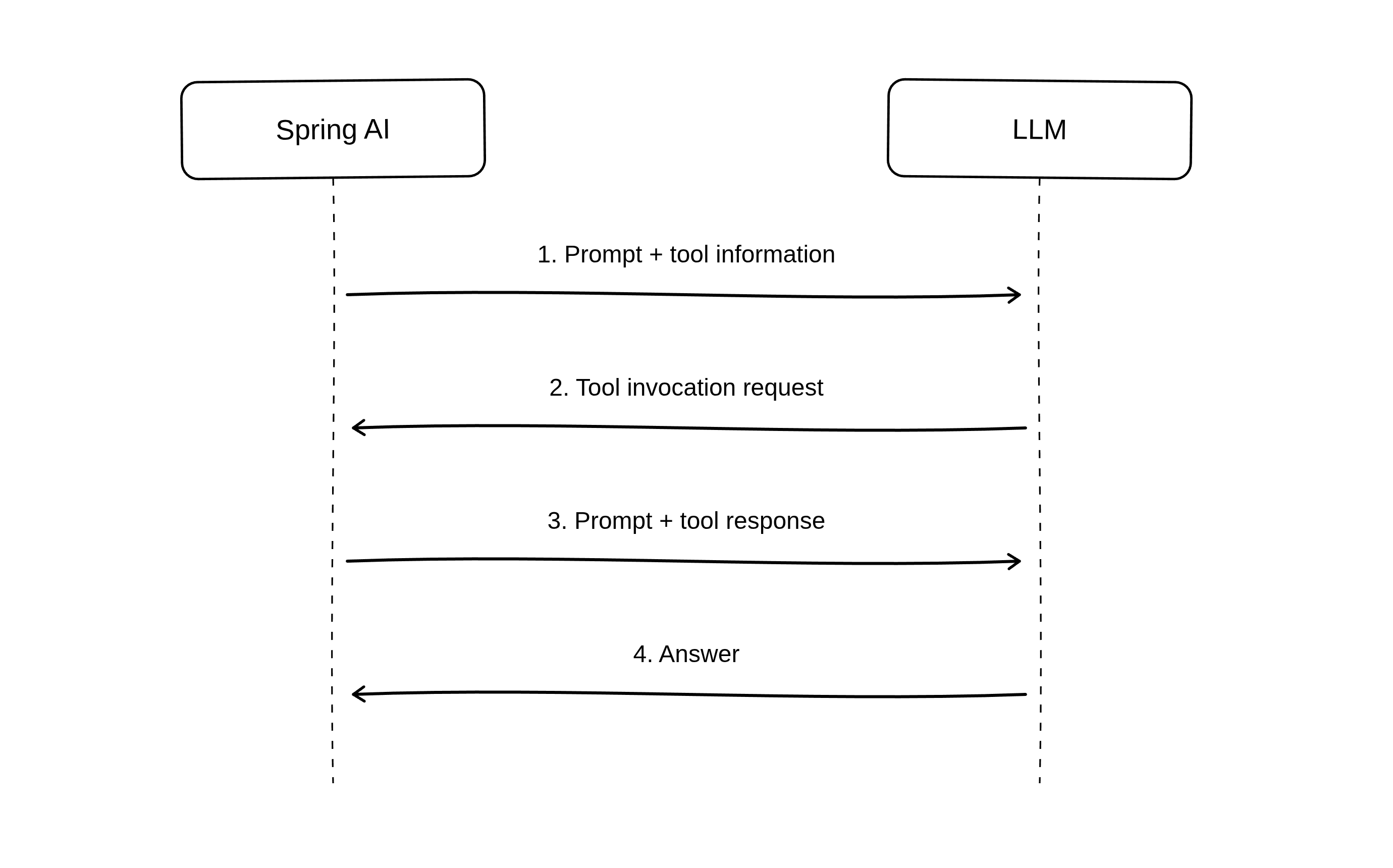
An LLM chat-client with tool calling
This tutorial reuses the simple chat-client developed in the Developing an LLM chat-client with Spring AI tutorial. However, we use the gemma4 model instead of Qwen VL 2.5.
Install the
gemma4snap:user@host:~$sudo snap install gemma4Make sure gemma4 is active by issuing the
gemma4 statuscommand:user@host:~$gemma4 statusengine: amd-gpu services: server: active server-webui: active endpoints: openai: http://127.0.0.1:8336/v1 webui: http://127.0.0.1:8337/ model: name: gemma4-e4b-q4-k-mClone the simple chat-client demo repository:
user@host:~$git clone https://github.com/pushkarnk/spring-ai-chat-client-demo && cd spring-ai-chat-client-demoUpdate
src/main/resources/application.propertiesto the following values:src/main/resources/application.properties¶spring.application.name=chat-client spring.ai.openai.base-url=http://127.0.0.1:8336 spring.ai.openai.api-key=ignored spring.ai.openai.chat.options.model=gemma4-e4b-q4-k-m
Make sure you have JDK 21 installed and run the application:
user@host:~$sudo apt update && sudo apt install openjdk-21-jdkuser@host:~$./gradlew bootRunOpen
http://localhost:8080in a browser window and enter the following question:Is Zig 0.16 available on Ubuntu?
The answer doesn’t really make sense:
While Zig is generally available for Linux, getting a very
specific and potentially older version like **0.16** directly
through standard Ubuntu package managers (like `apt`) can be
difficult because the official repositories often lag behind
the latest stable releases.
Adding a tool to the Spring AI application
The rmadison command line utility fetches archive package data that helps answer such questions. Let’s set up a tool that invokes this command.
Add a new @Component class named
src/main/java/demo/chatclient/UbuntuTools.javawith the following implementation:src/main/java/demo/chatclient/UbuntuTools.java¶package demo.chatclient; import org.slf4j.Logger; import org.slf4j.LoggerFactory; import org.springframework.ai.tool.annotation.Tool; import org.springframework.ai.tool.annotation.ToolParam; import org.springframework.stereotype.Component; import java.io.BufferedReader; import java.io.IOException; import java.io.InputStreamReader; import java.nio.charset.StandardCharsets; @Component public class UbuntuTools { private static final Logger logger = LoggerFactory.getLogger(UbuntuTools.class); @Tool (description = "Query the Ubuntu archive for package names and their versions across Ubuntu versions.") public String rmadison( @ToolParam(description = "Source or binary package name") String packageName ) { logger.info("Running rmadison for package: {}", packageName); try { Process process = new ProcessBuilder("rmadison", packageName) .redirectErrorStream(true) .start(); String output; try (BufferedReader reader = new BufferedReader( new InputStreamReader(process.getInputStream(), StandardCharsets.UTF_8))) { output = reader.lines().reduce("", (a, b) -> a + b + System.lineSeparator()); } process.waitFor(); return output; } catch (IOException e) { return "Failed to run rmadison: " + e.getMessage(); } catch (InterruptedException e) { Thread.currentThread().interrupt(); return "rmadison command interrupted: " + e.getMessage(); } } }
The
rmadison()method invokes the rmadison utility on the package name received from the LLM. This method is a@Tool. The result is converted to a String and returned to the LLM along with the user question.Instantiate an object of class
UbuntuToolsand configure it as a tools object while building the chat client. Modifysrc/main/java/demo/chatclient/DemoChatService.javaand modify the constructor source.Note
This is not a full source listing of DemoChatService.java
src/main/java/demo/chatclient/DemoChatService.java¶... public class DemoChatService implements DemoChatClient { private final ChatClient chatClient; public DemoChatService(ChatClient.Builder chatClientBuilder) { this.chatClient = chatClientBuilder .defaultTools(new UbuntuTools()) .build(); } ... ... }
Launch the application and navigate to
http://localhost:8080.user@host:~$./gradlew bootRunLet us try posting questions again.
Post the zig0.16 question:
Is zig0.16 available in Ubuntu?
This time we get a better answer. Something like:
Yes, according to the Ubuntu archive, a package named **zig0.16**
is available.

It has the version **0.16.0~us1-0ubuntu1** and can be found in the
`stonking/universe` repository for multiple architectures (amd64,
amd64v3, arm64, riscv64, s390x).
On the terminal running the server, a log message confirming the tool invocation is displayed:
2026-07-14T20:28:12.861+05:30 INFO 303854 --- [chat-client] [nio-8080-exec-1] demo.chatclient.UbuntuTools : Running rmadison for package: zig0.16
Try posting a question about zig0.17, an unreleased version:
Is zig0.17 available in Ubuntu?
An answer like the following is expected:
Based on the available information, the package `zig0.17` does
not appear to be available in the Ubuntu archive.
Conclusion
Spring AI makes LLM tool-calling very easy to implement. The effectiveness of a tool depends on how specific a task it is defined for and how close the description parameter of the @Tool annotation is to actual user questions. Refer to the Spring AI Tool Calling documentation for more details.